What Is MCP, the "USB of AI": How Agents Connect to Your Tools

What does MCP stand for?
MCP stands for Model Context Protocol, an open standard created by Anthropic in 2024 that defines how AI assistants connect to external systems such as email, calendars, databases and CRMs.
If you follow the AI world, you have probably bumped into this acronym: MCP. It shows up in product announcements, expert videos and developer talk, almost always without explanation. And when someone does explain it, they tend to explain it the hard way.
In this article you will understand MCP the Data Lover way: no jargon, real-world analogies, and a focus on what actually matters: what it changes in your life and work. Spoiler: quite a lot, because MCP is the piece that turns AI from a "smart parrot" into an assistant that actually gets things done.
The problem: an AI that only talks does not work
Think about the AI assistant you use today. It writes well, summarizes texts, explains topics. Now try asking: "look at my calendar for tomorrow and suggest the best time to answer my pending emails". On its own, it cannot. It does not see your calendar, cannot access your email, does not know your files.
It is like having a brilliant intern locked in a room with no computer, no phone and no access to anything in the company. They can give great advice through the door, but they cannot execute anything. For AI to truly work, it needs to connect to your systems: email, calendar, spreadsheets, databases, CRM.
And that is where the problem that blocked everything appeared.
Before MCP: a different cable for every socket
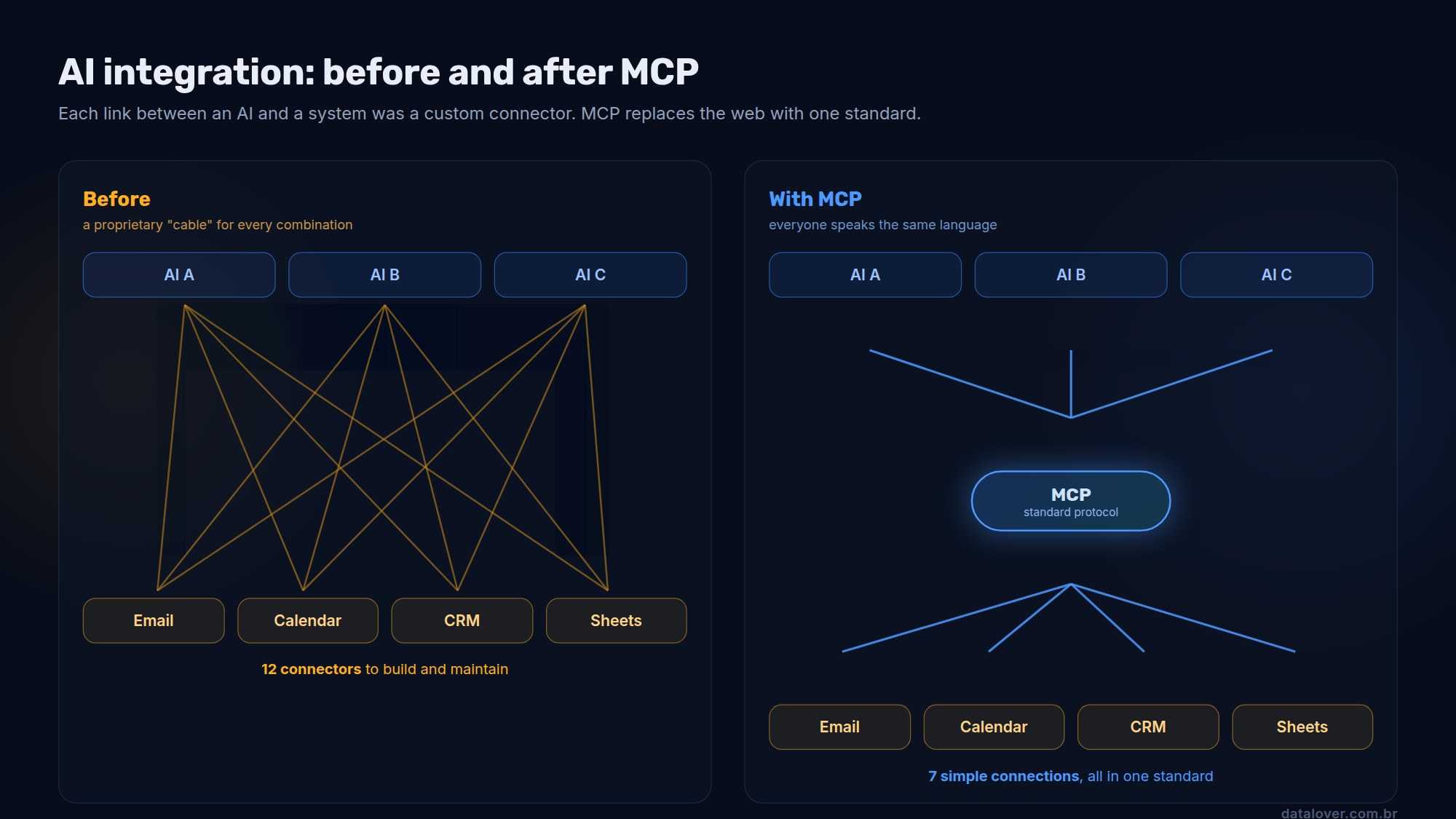
Until recently, every connection between an AI and a system was a custom project. Wanted to link assistant X to your CRM? Someone had to build that specific connector. Wanted to link assistant Y to the same CRM? Another connector, from scratch. Switched assistants? Throw it all away and start over.
If you lived through the 2000s, you remember the charger drawer: one for each phone, all incompatible. That was exactly the state of AI integrations: a proprietary "cable" for every combination of assistant and system. Expensive, slow and fragile.
So what is MCP
MCP stands for Model Context Protocol. It is an open standard, created by Anthropic in late 2024 and later adopted by the industry's main AI companies, that defines a single language for AI to talk to any system.
The analogy that stuck in the community is perfect: MCP is the USB-C of AI. Before, every device had its own connector; today, a single cable works for your phone, laptop and headphones. MCP does the same for integrations: a system exposes its functions once, in the standard, and any compatible AI can use them.
In practice, it works like this:
- On one side, "MCP servers": small programs that represent a system (your email, your calendar, your database) and tell the AI what can be done there: "I can list meetings", "I can look up customers", "I can create tasks".
- On the other, the "client": the AI assistant you use. It discovers which tools are available and decides when to use each one to accomplish what you asked.
- In between, the protocol: the rules of the conversation, the same for everyone. That is what makes any AI work with any connector.
An everyday example
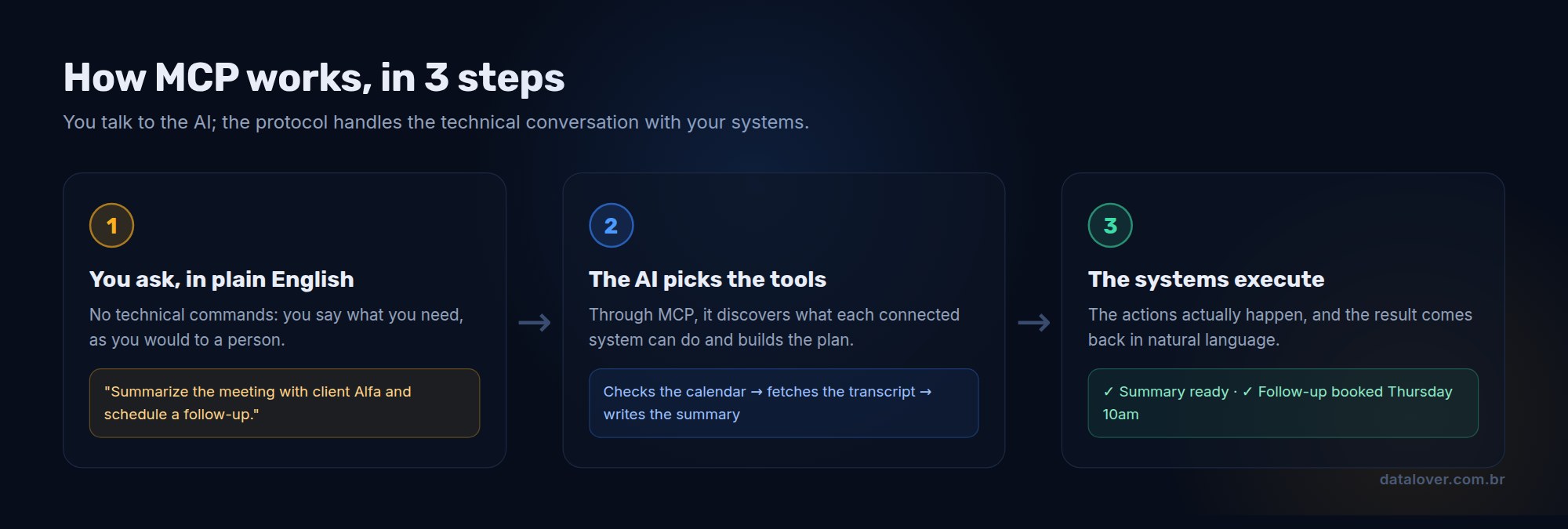
Imagine telling your assistant: "prepare a summary of the meeting with client Alfa and schedule a follow-up next week".
With MCP configured, the AI performs a sequence of actions: it queries the calendar connector to find the meeting, asks the notes connector for the transcript, writes the summary, and uses the calendar again to book the follow-up in a free slot. You gave one order in plain English; the protocol handled all the technical conversation behind the scenes.
Without MCP, that same request would end with the AI answering something like "I do not have access to your calendar". The difference between those two scenarios is the difference between an AI that advises and an AI that works.
What changes for you
For everyday AI users, MCP means assistants that are increasingly able to execute, not just answer. The tools you already use keep gaining new "sockets": connecting your assistant to your file drive, your email or your task system is becoming a matter of a few clicks, not an IT project.
It also changes how you choose tools. A new question joins the checklist: does it speak MCP? Tools compatible with the standard plug into the whole ecosystem; closed tools stay isolated.
What changes for companies
Here the impact is even bigger. Before, integrating AI with internal systems meant picking a vendor and marrying them, because each integration was a specific investment. With MCP, the math changes:
- Integrate once, use with any AI: the company exposes its system (the ERP, the CRM, the knowledge base) as an MCP server a single time. Any compatible assistant, from any vendor, can then use it.
- No forced marriage: if a better or cheaper AI model appears tomorrow, switching does not throw away the integrations. They are the permanent asset; the model is a replaceable part.
- A ready-made ecosystem: thousands of MCP connectors have already been published for the market's most common tools. A good share of the integrations your company needs may not even have to be built.
What about the risks? Handing over your house keys requires care
Connecting AI to your systems means giving it a key to your house. And house keys demand judgment. The essential precautions:
- Least privilege: give the AI only the access it needs for the task. The assistant that schedules meetings does not need access to your finances.
- Human approval at critical points: sensitive actions (messaging a customer, moving money, deleting data) should stop and wait for a human to approve. The AI prepares; you decide.
- Trusted sources: install connectors the way you install apps: only from sources you know. A malicious connector would have the same access you granted it.
None of this is a reason to stay out; it is a reason to come in the right way, as we do with any technology that touches important data.
How to get started
If you are a curious user: look for the "connectors", "integrations" or "MCP" section in the AI assistant you already use and connect something simple and low-risk, like your file drive. Feel in practice the difference between an AI that talks and an AI that acts.
If you run a business: pick one high-value internal system (the customer base, inventory, the appointment calendar) and run a pilot exposing it to an assistant, with limited access and human approval. A small pilot teaches more than six months of meetings about "AI strategy".
MCP is the kind of technology nobody sees but everybody will use. Like USB, like Wi-Fi. Soon, saying an AI "speaks MCP" will sound as obvious as saying a laptop has a USB port. Those who understand this now, while most people still think it is jargon, get ahead.
Frequently asked questions
MCP stands for Model Context Protocol, an open standard created by Anthropic in 2024 that defines how AI assistants connect to external systems such as email, calendars, databases and CRMs.
It lets AI take real actions in your systems: checking the calendar, looking up customer data, creating tasks, reading files. Without MCP the assistant only talks; with MCP it works.
Because, just as USB-C unified chargers, MCP unified integrations: a system connects to the standard once and works with any compatible AI assistant, with no custom connectors.
It is safe when configured well: grant the AI only the access it needs, require human approval for sensitive actions and install connectors only from trusted sources. Connecting systems to AI deserves the same care as any access to important data.
At least understand it and run a pilot. Companies that expose their systems in the standard integrate once and stay free to use any AI on the market, with no vendor lock-in. A small pilot with limited access is the best start.
Data and AI executive with 20+ years building technology that moves businesses. Microsoft Certified Trainer, with executive education at MIT Sloan. At Data Lover, he trains professionals and leads enterprise AI projects.
See profile and all articles →